

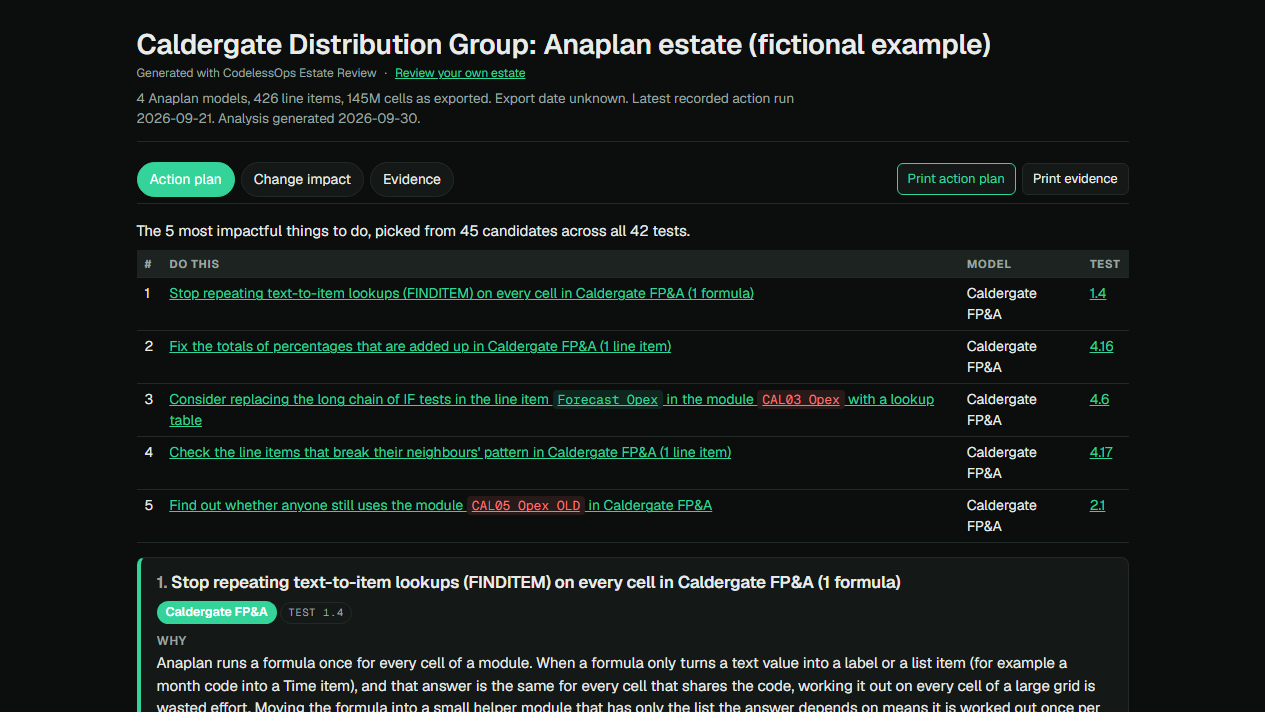
Updated 30 September 2026 for v0.2.0: the tests are now a numbered list of 42, and the report opens on the five most impactful actions rather than every candidate. The numbers and the first screenshot below are from that version.
I built Anaplan Estate to turn model exports into practical suggestions for improving an Anaplan build. Upload the metadata, it runs the same 42 tests on every model, and the report opens on the five things most worth doing, with the dependencies to trace before you change anything.
It’s free, open source and MIT licensed. You can use the hosted tool or run the same analysis locally.
Open Anaplan Estate · Explore the fictional example · The 42 tests · Source code and setup on GitHub
What you can use it for
- An optimisation review: identify formula patterns, large calculations and possible duplication, with the relevant objects and evidence in one report.
- Scoping a model change: follow a line item’s upstream inputs and downstream readers to help choose what to test.
- Reviewing old modules and actions: investigate modules with no detected consumers, stale imports and imports outside a process.
- A CoE or consultancy review: compare several models, inspect repeated logic and turn findings into a working backlog with notes and decisions.
What the report contains
Action plan. The five most impactful things to do, each with an explanation, the line items involved, suggested steps, a completion check and the number of the test that found it. Every other candidate is listed under the plan with the reason it is not on it.
Change impact. Search for a module or line item, follow dependencies in either direction, inspect paths and explore a clickable diagram. You can download a change review as JSON.
Evidence. Every test with its result on your exports (found, clear, or not run and why), then the searchable findings, formulas, model inventory, calculation-effort information where supplied, dependency coverage and inferred feeds between models. Add review statuses and notes, then download a findings register or a working register as CSV.
The tests are 42 defined rules over the supplied exports, in six areas: performance and size, usage and leftovers, dependencies, correctness and maintainability, imports and exports, and how far to trust the analysis itself. The full list says what each one looks for and which export it needs. A test that could not run is reported as not run, never as clear.
How the five are picked: every test that found something offers a candidate action. Candidates are ranked on evidence, on whether they name a bounded set of objects, and on what is at stake. That last one is measured where it can be (share of calculation effort, cells) and fixed by the test where cells say nothing: a total that may be wrong ranks high however small the line item; a naming or housekeeping finding ranks low. A concrete change comes before an investigation. The first five that meet the bar are the plan.
Findings from the example estate
The built-in Caldergate example contains four models and 426 line items: a Data Hub, FP&A, Workforce Planning and Board Reporting.
On it, 35 of the 42 tests find something. That becomes 45 candidate actions, 10 meet the bar, and the plan opens on five. Everything else is listed under the plan and in Evidence.
Caldergate is fictional. Its scenarios, cell counts and calculation-effort figures are synthetic demonstration data. These findings are not measured customer savings.
| Finding | Example | What to investigate |
|---|---|---|
| FINDITEM across a large grid | DAT01 Actuals GL.Journal Cost Centre applies FINDITEM across roughly five million cells. | Establish which dimensions the result actually depends on and whether a smaller helper module would work. |
| A percentage whose totals are added up | CAL07 P&L by Cost Centre.EBITDA Margin divides EBITDA by revenue and has the summary method Sum, so the all-cost-centres total adds the percentages. | Set the summary to Formula, or to None where no total is shown. |
| Long IF chain | CAL03 Opex.Forecast Opex maps accounts to drivers through 12 IF branches. | Move the mapping into a table, compare results and measure any performance change. |
| The odd one out | CAL12 Driver Phasing.Insurance Phased reads the Current Period flag where its 29 neighbours read Actual. | Ask the owner whether the exception is meant; record why, or bring it in line. |
| Old module with no detected external formula readers or export consumer | CAL05 Opex OLD contains 14 calculated line items and 70.2 million cells. | Check pages, saved views, integrations and retention requirements before deciding whether to retire it. |
| Stale import outside a process | Import from Caldergate Hub v1 - Cost Centres was last recorded as running in March 2021. | Confirm whether it is still needed and how it is used. |
| Matching calculations across models | Employer NI and Working Days appear in FP&A and Workforce Planning. | Compare ownership and purpose before deciding whether to share the logic or retain both versions. |
The example’s documentation lists the scenarios deliberately built into it.
Walkthrough: from a finding to a review decision
1. Open the example and choose an action
Open the Caldergate action plan. It opens on a table of the five actions; take the third, the proposal to replace the long IF chain in Forecast Opex with a lookup table.
The card shows the original formula, why it was selected, the proposed steps and what must be true before the change is complete. Here, the values must reconcile before and after, and performance needs to be measured.
2. Follow its dependencies
Click Change impact on that action, or open Forecast Opex directly.
It has one direct reader, but following the formula chain reaches 27 line items across seven modules. The most distant reachable items are eight formula links away.
That gives you named calculations to consider in the test plan, including P&L, cash-flow and board-pack outputs.
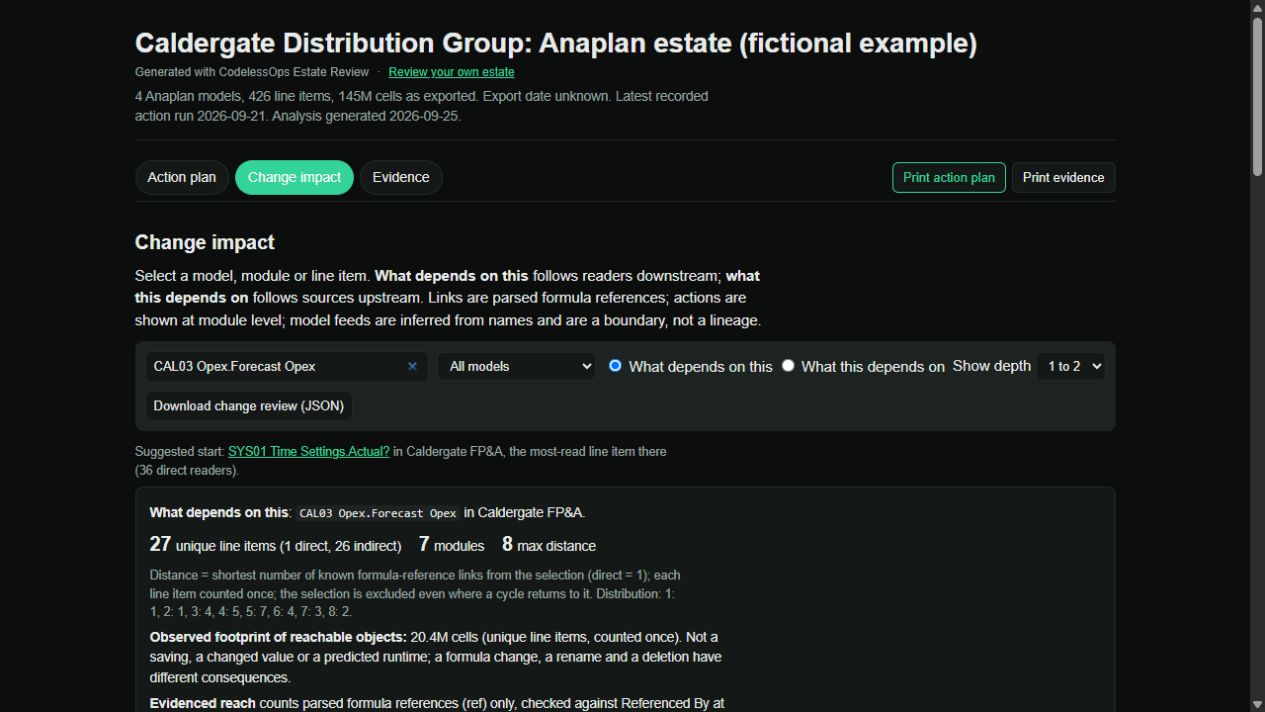
Set Show depth to all to expand the displayed reach. Use What this depends on to inspect upstream inputs, or click a box in the diagram to centre the view on that line item.
The 27 reachable items describe formula dependencies. They don’t mean all 27 values will change.
3. Check the evidence
Open Evidence and search for an object or formula. Enable show low-importance findings to include the rest of the catalogue.
Open a finding to see its evidence, proposed step, validation plan and reasons the current design might be worth keeping. For CAL05 Opex OLD, the outstanding consumer and retention checks are part of the decision.
4. Record what you decided
Set the finding’s review status and add a note. The available statuses are To review, Investigation in progress, Accepted exception, Change planned and Resolved.
Use Download working register with your statuses and notes (CSV) to take the review into a backlog or handover. Notes and statuses are stored in that browser; download the register when you need to share them.
Run it on your own models
- In Anaplan, go to Model Settings → Modules → Line Items → Export. Export every column as CSV. Line Items is the required file.
- Add an Actions export from Model Settings → Actions → Export for import, export and process checks. A Modules export adds module information and notes.
- Open the upload page, enter a model name and attach its files. Use Add another model for a wider estate.
- Select Build the report, then work through Action plan, Change impact and Evidence. The generated HTML report also opens offline.
For a zip upload, put each model’s files in its own folder:
estate/
  FP&A/
    Line Items.csv
    Actions.csv
    Modules.csv
  Workforce/
    Line Items.csv
    Actions.csv
Use English column headers. Exporting all columns gives the checks more to work with; missing information is shown as a coverage gap.
Run it locally
With Python 3.10 or newer installed, run:
pip install "https://github.com/klameer/anaplan-grammar/archive/refs/heads/master.zip"
pip install "anaplan-estate[web] @ https://github.com/klameer/anaplan-estate/archive/refs/heads/master.zip"
anaplan-estate-web
Open localhost:8000 and use the same interface. Your exports stay on your machine. The GitHub repository also documents the command-line workflow.
What still needs your judgement
Estate analyses the exports. It can’t establish every use in UX pages, saved views, filters, access controls or integrations. Actions are associated at module level, and feeds between models are inferred from names rather than verified line-item mappings.
A finding is a candidate to review. Test changes in a development copy, reconcile the outputs and measure any claimed improvement.
For hosted runs, uploaded files are deleted after the report is returned. The service records basic usage statistics, including report outcomes and counts; the application doesn’t log file names, model names or formulas. Use the local option when your metadata needs to stay on your machine.
Try Anaplan Estate or explore the example first. If a finding is useful, wrong or missing something, or there is a test you expected and did not find, share the specifics on GitHub and we can build it together.
Anaplan Estate is an independent creation, not affiliated with, endorsed by or supported by Anaplan, Inc.; Anaplan is their trademark. If you download or use it, you do so at your own risk.